
ACP: Copilot in Xcode, without the plugin 🔌
There’s a new standardization layer in the agentic-coding stack, and it’s a good one: the Agent Client Protocol (ACP). After MCP standardized what tools an agent can reach, ACP standardizes how editors and agents talk to each other — local or remote — so any ACP agent drops into any ACP editor with no bespoke, per-vendor glue. It’s developed in the open (JetBrains and Zed), and there’s a clean introduction if you want the protocol view.
The reason this matters today: Xcode 27 speaks ACP. (It’s in the developer beta, and it’s already turning up in the 26.6 RC.)
MCP vs ACP, in one line
Xcode 27 actually has two protocol layers, and it’s worth keeping them straight:
- MCP decides what an agent can do inside Xcode — read files, build, run tests, pull diagnostics.
- ACP decides which agents are even allowed to connect in the first place.
So ACP is the front door, MCP is the toolbox once you’re inside. Apple shipped GitHub and Figma as launch plugin partners — but because the door is a standard, you don’t actually need their plugin. Any ACP-speaking agent can knock.
The trick: register Copilot CLI as a raw ACP agent
Copilot CLI can run as an ACP server, so you can wire it straight into Xcode instead of installing the official plugin. In Xcode → Settings → Intelligence → Coding Intelligence → Add an Agent…:
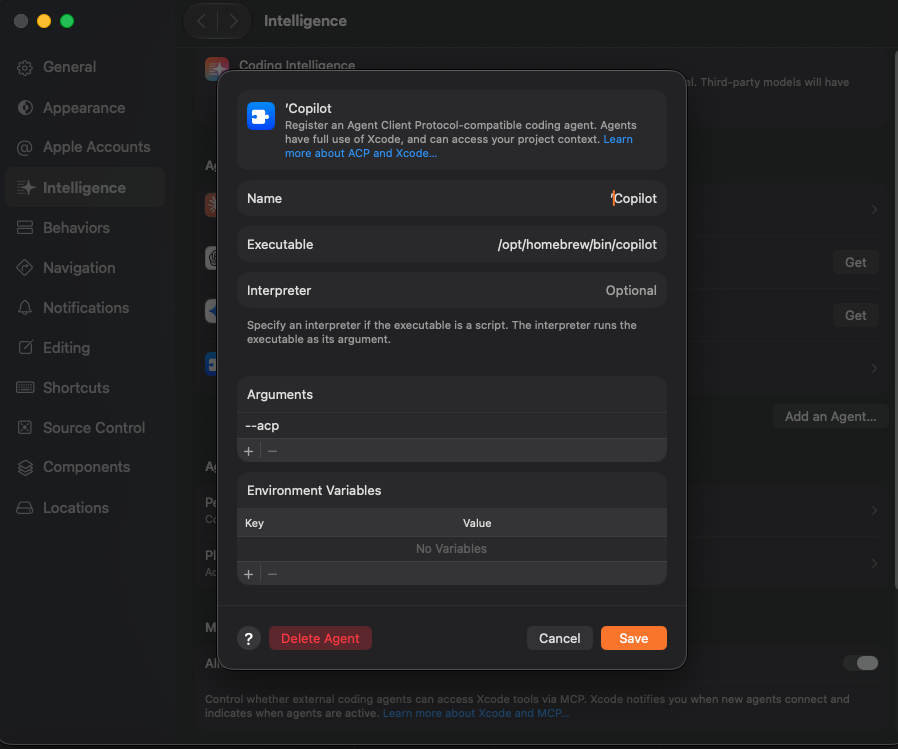
- Name:
Copilot - Executable:
/opt/homebrew/bin/copilot(wherever Homebrew put it —which copilot) - Arguments:
--acp
That’s the whole registration. Xcode notes that ACP agents get full use of Xcode and your project context, and it asks for consent before a new agent connects — the protocol is permissioned by design, not a backdoor.
Pick your model with an env var
The fun part: you’re not locked to one model. Add an Environment Variable to the agent and pin whichever model you want — for example:
COPILOT_MODEL=claude-sonnet-4.6So you get Copilot’s harness and auth, driving the model of your choice, inside Apple’s IDE. “Use any LLM in Xcode” is barely an exaggeration.
Under the hood
If you want to see what Xcode is launching, the CLI flag is documented. --acp
defaults to stdio mode (ideal for an IDE spawning the process); add --port
for TCP instead:
copilot --acp --stdio      # stdio (default when --acp is passed)
copilot --acp --port 3000  # TCP
One caveat worth flagging: ACP support in Copilot CLI is still public preview, so flags and behavior may shift. Tool-filtering and reasoning-effort flags, if you pass them, apply per session started by the client.
Worth reading
- Agent Client Protocol — introduction
- Agents that speak ACP · Clients that speak ACP
- Copilot CLI ACP server — GitHub Docs
- Use any LLM in Xcode 27 via ACP (Reddit)
The bigger picture: the N×M integration problem — every editor needing a custom connector for every agent — collapses to N+M once both sides speak a shared protocol. MCP did it for tools; ACP is doing it for the agents themselves. Xcode adopting it this fast is the surprise. 🔌
← Back to all writing